
React: mistakes to avoid when using hooks
The most common mistakes to avoid when using React hooks: conditional calls, order, nested functions, and how to recognize them.
The introduction of React hooks simplified and made much of React’s code more readable. Hooks are JavaScript functions, but they have specific rules that must be followed to avoid running into errors.
Let’s look at a few together.
Table of contents
- Using hooks outside React functions
- Using hooks inside loops, nested functions, or conditionally
- Conclusions
Using hooks outside React functions
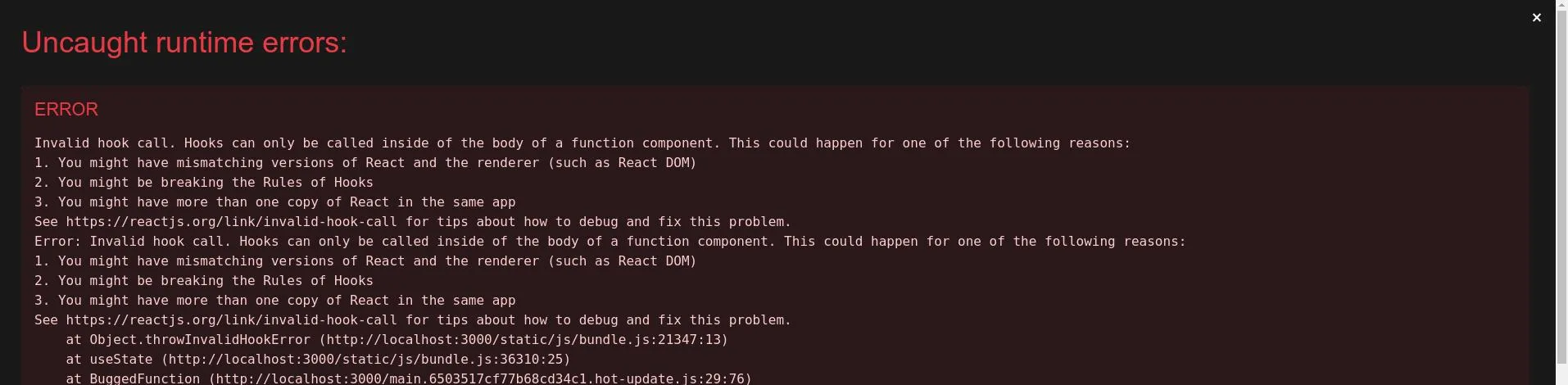
The error that usually shows up in the console is:
Invalid hook call. Hooks can only be called inside of the body of a function component. This could happen for one of the following reasons... react-hooks/rules-of-hooks
or
React Hook "useState" cannot be called inside a callback. React Hooks must be called in a React function component or a custom React Hook function react-hooks/rules-of-hooks
or even
React Hook "useState" is called conditionally. React Hooks must be called in the exact same order in every component render react-hooks/rules-of-hooks
Once we start using hooks, the temptation to use them everywhere is strong. Unfortunately, they can’t be used outside of React components or React functions.
We can use hooks inside:
- React components
- Any custom hooks we write
Example code: hook inside a generic function
import { useEffect, useState } from "react";

// example function, uses a hook but shouldn't
const BuggedFunction = () => {
  const [state, setState] = useState(0);

  return state;
};

function App() {
  useEffect(() => {
    BuggedFunction(); // calling the function
  }, []);

  return <div className="App">Example component</div>;
}

export default App;
Result in the browser
Using hooks inside loops, nested functions, or conditionally
The error that usually shows up in the console is:
React Hook "useEffect" is called conditionally. React Hooks must be called in the exact same order in every component render. Did you accidentally call a React Hook after an early return?
Hooks must always run in the top-level component, in the same order, and always all of them. This lets React correctly know and manage the various component states across the different renders it performs. Changing the order, or whether a hook runs at all, breaks this rule and React doesn’t know how to handle the situation, throwing the error in the console.
Example code: hook inside a hook
function App() {
  useEffect(() => {
    const [state, setState] = useState(0); // hook inside a hook
  }, []);

  return <div className="App">Example component</div>;
}
Result in the browser

Example code: conditional hook
function App(props) {
  if (props.variable) {
    // calling a hook based on a variable's value
    const [state, setState] = useState(0);
  }

  return <div className="App">Example component</div>;
}
Result in the browser

Conclusions
The errors shown above are fairly clear, and the messages that appear in the console correctly point to where in the code a specific error occurred.
Also, still in the browser console, right below these errors you’ll find references to the official React guide.
What matters is taking the time to read and understand the messages.

Co-Founder & CTO at PAPION. Senior software engineer with AI skills: React, TypeScript, Node.js, LLM and AI agent integration, and application security.